19 September 2026 · By Sam Thomas
Best Make vs n8n: Which Tool Fits?
Compare Make vs n8n with ForwardThis across setup, flexibility, hosting, and email‑based admin automation to find the right fit.

You need a way to move data from email into the apps you already use, but you don’t want to spend hours wiring up a workflow. Below is a short list of the top picks for email‑driven automation, plus a quick guide to help you decide which one matches your style.
Table of Contents
- ForwardThis — Email‑first automation for one‑off admin work
- Make — Visual workflows with broad integration coverage
- n8n — Technical automation with self‑hosting flexibility
- Make vs n8n vs ForwardThis: Key differences at a glance
- Which option fits your type of work?
- How to Choose Checklist
- FAQ
- Conclusion
1. ForwardThis — Email‑first automation for one‑off admin work
ForwardThis is an email‑first operations app that lets you forward a message, add a plain‑text instruction, and watch the work happen in the background. It’s built for people who spend most of their day in Gmail, Outlook, or Apple Mail and then have to hop into HubSpot, Asana, Google Drive, or other tools to finish a tiny task.
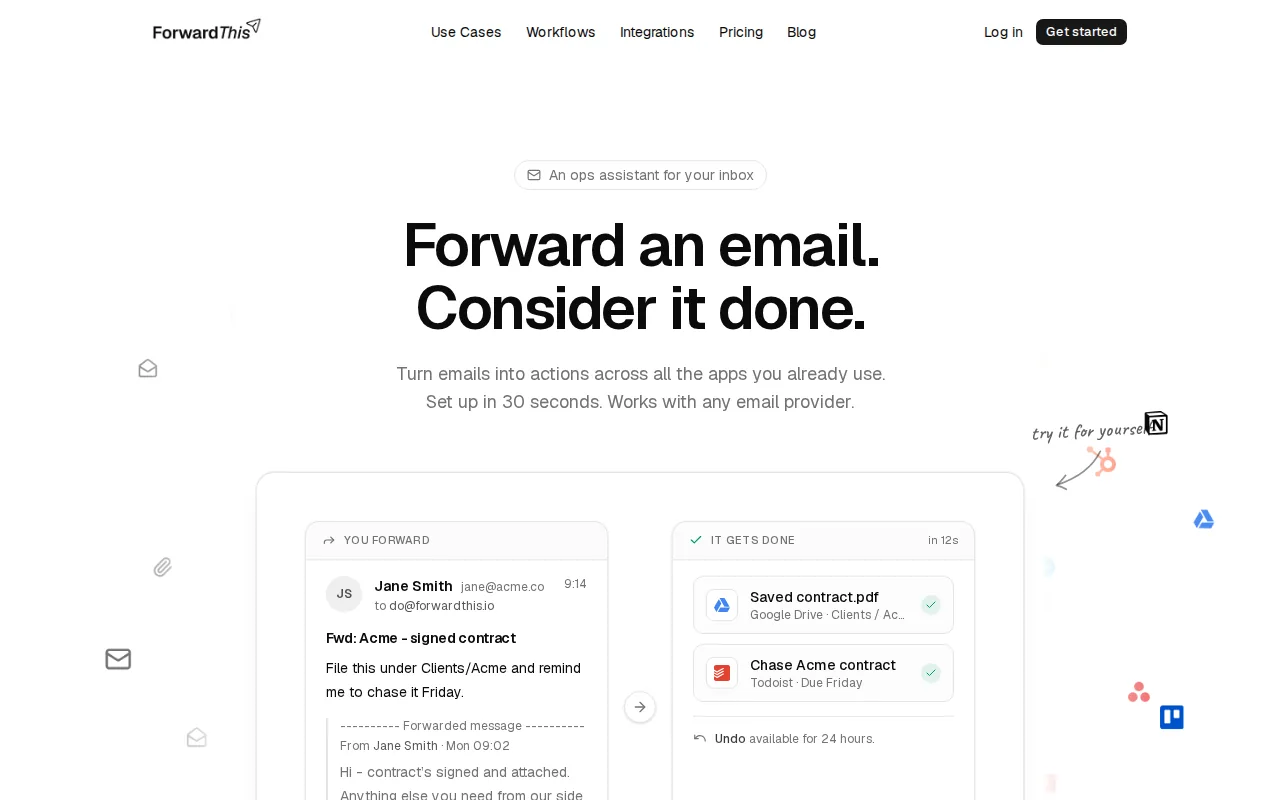
Who it’s best for: solo founders, agency account managers, recruiters, and anyone who handles a handful of admin jobs each day and would rather not open a separate app for each one.
Why it earns the spot:And because it only sees the emails you forward, the privacy surface is tiny compared with tools that ask for full mailbox access.
- Zero‑code. You never build a workflow ahead of time, you just tell ForwardThis what to do in the email.
- Supports 145 integrations, from HubSpot contacts to Google Drive folders.
- Replies by email with a clear record of what changed, so you have an audit trail without leaving your inbox.
Limitation: it’s not a full‑scale integration platform. If you need a repeatable process that runs every hour, a traditional workflow tool may be a better fit.
Try it with a real email and see how quickly a simple instruction turns into an updated CRM record.
2. Make — Visual workflows with broad integration coverage
Make lets you build visual scenarios that connect over 3,000 apps, APIs, and AI models. You can drag‑and‑drop modules, write a prompt, or add a line of code, then watch the flow run on a canvas.
Who it’s best for: teams that need a reusable, company‑wide automation that touches many systems, marketing, sales, finance, HR, and want a single place to see every connection.
Why it earns the spot:
It also offers AI agents that can be triggered by email, but the workflow must be defined in advance, you can’t just write a new instruction on the fly.
Limitation: the UI can feel heavy for a single‑step task, and the platform does not list a free tier, so you’ll need a paid seat to start.
3. n8n — Technical automation with self‑hosting flexibility
n8n offers a visual canvas plus the ability to drop in custom JavaScript. What sets it apart is the option to run the whole engine on your own server, Docker, or a private cloud.

Who it’s best for: technical teams that want full control over data, need on‑prem deployment, or want to mix low‑code nodes with hand‑written code.
Why it earns the spot:
It also supports “human‑in‑the‑loop” steps, so you can pause for approval before a critical action runs.
Limitation: the learning curve is steeper than Make’s drag‑and‑drop UI, and you’ll need some DevOps knowledge to keep the self‑hosted instance up.
If you already have a Docker host, the initial setup is a matter of a few commands; otherwise the hosted cloud version removes that hassle.
Make vs n8n vs ForwardThis: Key differences at a glance
| Aspect | ForwardThis | Make | n8n |
|---|---|---|---|
| Trigger style | Email‑forwarded instruction | Pre‑defined scenario trigger | Pre‑defined trigger or webhook |
| Setup effort | Minutes – just forward an email | Hours – design visual flow | Hours‑to‑days – install or self‑host |
| Integration breadth | 145 core apps (HubSpot, Asana, Drive…) | 3,000+ connectors | Community nodes, custom code |
| Hosting | SaaS, no server mgmt | Cloud SaaS (optional private cloud) | Fully on‑prem possible |
| Free tier | Free plan available | No free tier listed | No free tier listed |
| Best for | One‑off admin from email | Company‑wide repeatable pipelines | Technical teams needing control |
Read more about how ForwardThis stacks up against n8n in our ForwardThis vs n8n guide.
Which option fits your type of work?
If you spend most of your day replying to client emails and need to push a single piece of info into a CRM or task board, ForwardThis will save you the most time. You just forward the mail, add a line like “Create a follow‑up in Asana for Friday,” and the system does the rest.
If you run a marketing team that needs to pull leads from a web form, enrich them in HubSpot, and then push a notification to Slack every day, Make gives you a visual map that anyone can read and edit.
If your organization handles sensitive data, must meet strict audit requirements, or wants the automation engine inside your firewall, n8n’s self‑hosted option is the only one that meets those needs.
How to Choose Checklist
- Do you need a one‑off email action or a repeatable pipeline?
- Do you prefer a visual canvas (Make) or code‑first flexibility (n8n)?
- Is on‑prem hosting a requirement?
- What is your budget for paid seats?
- How many integrations do you actually need?
Answering these questions narrows the field quickly.
FAQ
Can I use ForwardThis with Gmail?
Yes. ForwardThis works with any email service that can send a standard email, including Gmail, Outlook, and Apple Mail.
Does Make offer a free plan?
Check Make’s current pricing to see which plan fits your needs.
Can I self‑host n8n?
Yes. n8n provides a fully on‑premises option.
Which tool handles large file attachments best?
ForwardThis can save an attachment straight to Google Drive or OneDrive from the email you forward, making it the simplest choice for occasional large files.
Are there limits on how many apps Make can connect to?
Make offers 3,000+ integrations, so you’re unlikely to hit a hard limit for most business needs.
Is there a community or support for n8n?
n8n has a public community of over 200 k members and offers paid support plans for enterprises.
For a deeper look at Zapier vs Make, see our Best Zapier vs Make Comparison article.
Explore other options for email‑driven automation in our Best n8n Alternatives for Email Automation guide.
Conclusion
Pick ForwardThis if you need instant, email‑based admin work; choose Make for visual, repeatable pipelines; and go with n8n when you need code flexibility and on‑prem control. Try ForwardThis today and forward your first admin email to see the difference.
- A fully on-prem option is available.
- Open‑source core means you can extend any node or add a new connector yourself.
- Version control, RBAC, and audit logs let you treat automations like code.
- Massive integration library ("3,000+ integrations").
- Enterprise‑ready security: GDPR, SOC 2 Type II, SSO, and encryption are built in.
- Visual overview makes it easy to hand a scenario to a teammate for review.