15 September 2026 · By Sam Thomas
Notion Mail Alternatives for Email Admin
Compare notion mail alternatives by use case, including email clients, AI inbox tools, email-to-Notion capture, and cross-app admin.

Notion Mail is shutting down on September 22, 2026, but there isn't one replacement for every user. Some people need a new email client. Others need inbox sorting, email capture into Notion, or a way to finish the work that starts in email. These notion mail alternatives fit those jobs differently.
Table of Contents
- Replace your email client
- Organise your inbox with AI
- Capture and structure emails in Notion
- Handle the work in emails across your apps
- Compare the four jobs
- FAQ
- Choose your next step
Replace your email client
Start with Gmail if you want to keep reading and sending mail from the account you used with Notion Mail. Your sent and received messages already live there. You can use Gmail directly while deciding whether you need another app.
Thunderbird is another option if you want a desktop app with several email accounts in one place. It supports separate accounts or a unified inbox on Windows, macOS and Linux. It is free, open-source software.
Gmail is the straightforward choice for staying in your existing account. Thunderbird suits someone who wants a separate desktop workspace. Neither choice recreates the custom Notion Mail views you built, so judge it on the daily work of reading, searching and replying.
Organise your inbox with AI
Gemini in Gmail can summarise threads, help with drafts, find information and apply labels. It suits a Gmail user who wants help inside the inbox. Availability depends on an eligible Google Workspace or Google AI plan, with some features also offered through Google's tester programme.
SaneBox suits someone whose main problem is deciding which messages deserve attention now. It moves lower-priority mail into SaneLater and learns from messages you move between folders. You keep using your existing email app and can review the sorted messages there.
Choose Gemini for help understanding or acting on messages inside Gmail. Choose SaneBox for automatic prioritisation across a compatible existing mailbox. These solve inbox work; saving records into Notion is a separate job.
Capture and structure emails in Notion
Use this category when you want a message or its details available in a Notion database. Quicktion focuses on saving the email record. Airparser focuses on extracting fields and passing them to another app.
Quicktion
Quicktion is for people who want email saved into Notion or another structured destination. It fits the email capture side of notion mail alternatives, rather than the email client side.
You can forward messages from Gmail, Outlook, Apple Mail, or another email service. Quicktion can send the message into Notion, Airtable, Linear, Google Sheets, Trello, or Google Drive. The saved record can include the subject, sender, date, clean body text, links, and attachments.
Its AI feature uses a plain-English prompt to pull fields from the message. For example, you might ask it to extract the company name, deal stage, priority, and due date. You can also ask it to read an attached invoice or receipt image, then place fields into the destination you chose.
This is useful when your main goal is a searchable database. A recruiter could forward candidate emails into a Notion database. A consultant could save project requests into Airtable. A finance team could send invoices into a sheet with vendor, amount, and due date fields.
Quicktion says its free plan covers core email forwarding, while AI parsing is part of its Pro plan. That split matters. Basic capture and AI extraction are different needs, so check which one you require before comparing plan limits.
Quicktion is also a strong fit when email formatting and attachments need to stay with the record. The trade-off is that it won't replace your inbox or carry out broad operational work across many business tools. It is mainly a save-and-structure choice.
Quicktion is closer to a structured intake pipe: email comes in, fields are pulled out, and a record lands in the destination.
Airparser
Airparser is for AI-first extraction from emails, PDFs, and images. It belongs in the structured data part of the notion mail alternatives discussion, not the replacement email client category.
You define a schema in plain language. A schema is the list of fields you want back, such as customer name, invoice number, total, or due date. Airparser extracts those fields, then sends the result through Zapier, Make, an API, or a webhook.
This is useful when messages arrive in several layouts. A company may receive invoices from many suppliers, and each supplier may use different wording. AI extraction can be more forgiving than a fixed text pattern in that setting.
The trade-off is the destination. Airparser focuses on extracted fields rather than keeping the whole email as a readable Notion page. Reaching Notion or Airtable may also require another automation layer, depending on the setup.
That distinction matters during a handoff. If someone needs to review the original message, open the attachment, and understand the surrounding thread, a field-only result may feel thin. If the finance team only needs vendor, amount, and due date, a clean field set may be exactly right.
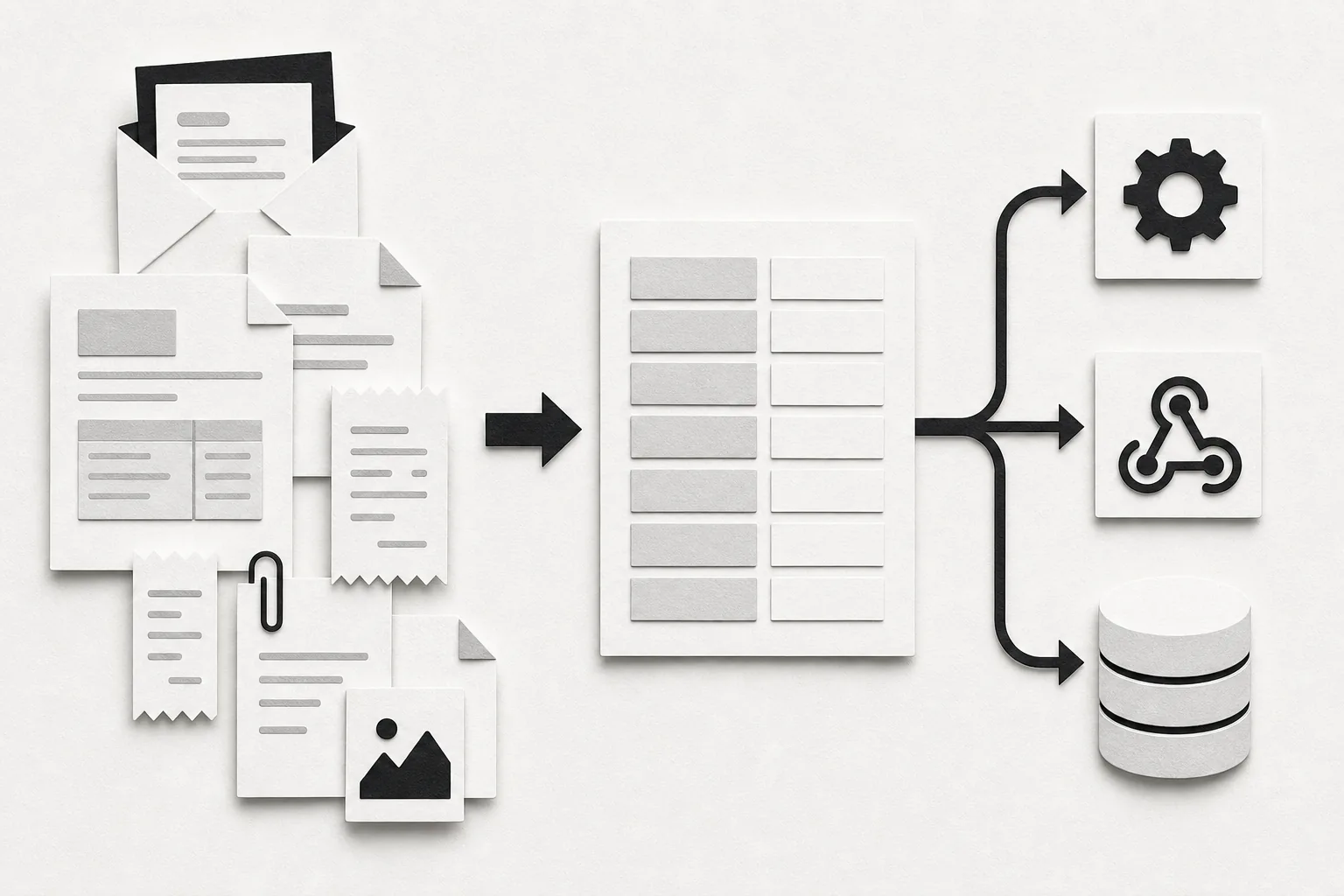
Airparser is a sensible choice for LLM-first extraction when you can accept generic exports and a separate connection to the final app.
Pick it when the extracted values matter more than the email record. Pick Quicktion when the email itself needs to remain easy to read inside the destination.
Handle the work in emails across your apps
This category is for the follow-up work: creating a task, saving an attachment or updating a project. Zapier and Make suit repeatable processes you want to configure. ForwardThis suits individual requests where you describe what should happen to this email.
Zapier
Zapier suits teams that already use fixed automations and want email to trigger the next step. It is a familiar option among notion mail alternatives, but it asks you to define the workflow first.
For example, a Zap can watch Gmail or Outlook, then create a Notion page when a message meets a rule. You can add more actions after that. A message might create a task, update a record, or send a notification as part of the same chain.
Zapier also has Email Parser by Zapier. You create a custom mailbox with a robot.zapier.com address, send it a sample email, and highlight the parts you want to capture. Those fields can then trigger a Zap.
This approach works well when the email layout stays stable. Order confirmations, lead notices, and standard form emails are easier to parse than long threads written in different ways by different people.
The limitation is maintenance. Template-based parsing can break when the surrounding words or email layout change. The parser also works with email text rather than reading attached files, so it may not fit invoice or receipt workflows that depend on PDFs or images.
Zapier makes sense when you already pay for it and want email to be one step in a larger automation. It is less appealing for a one-off request such as “save this file and remind me next Friday.” For that kind of work, building a Zap can take longer than doing the task.
Think of Zapier as a set of standing rules. It is a good match when the same trigger should produce the same result each time.
Make.com
Make.com is for people who want visual control over multi-step automations. It can connect Gmail, Google Calendar, Notion, Slack, and other apps, but its setup takes more thought than a simple forwarding instruction.
Make.com also offers an automation feature that can route natural-language commands to actions. A user might send a command involving Gmail, Google Calendar, or Notion, then let the automation decide which connected action to run.
That sounds close to an email assistant, but the working model is different from ForwardThis. Make.com is an automation environment. You still need to understand scenarios, modules, permissions, and the path data takes between steps.
There is also a second Make path that buyers often confuse with the AI Agent. The email trigger can pass text into a parser module that uses regular expressions. A regular expression is a pattern that finds matching text, such as a value after “Order number.”
Regex can be cheap and exact when the input is stable. It can also be hard to maintain. If a supplier changes “Total due” to “Amount payable,” the pattern may stop finding the value. Someone who knows regex can fix it quickly. Someone who doesn't may spend an afternoon testing patterns.
Make.com fits technical users who want granular control or already manage scenarios there. It is less suited to a busy professional who wants to forward one messy email and describe the result in normal language.
The choice is simple: use Make.com when you want to build and inspect the machine. Use an email-first option when you want to hand off the job without building the machine.
ForwardThis
ForwardThis is for people who want email-driven work handled across the apps they already use. It isn't another inbox, and it isn't a one-to-one Notion Mail clone.
You forward an email, write a plain-English instruction, and ForwardThis carries out supported actions in connected business apps. You can write:
- “Add this to Notion and remind me Friday.”
- “Save the attachment to Drive and update the Notion project.”
- “Create an Asana task from this and make it due next Tuesday.”
- “Add this person to HubSpot and follow up Friday.”
ForwardThis supports actions across 145+ connected apps, including Notion. For example, you can ask it to save an attachment in Google Drive and update the related Notion project in the same email. Connect the apps needed for the actions you request.
The key difference from most Notion Mail alternatives is the starting point. You don't need to move into a new email client. Gmail, Outlook, Apple Mail, or any service that sends normal email will work. There is no browser extension to learn and no workflow to build before you can try a job.
ForwardThis fits people who read an email and then need to update another app. It acts on messages you choose to send or forward. Mailbox access is optional: you can explicitly connect Gmail or Outlook if you want it to search your mail.
ForwardThis remembers useful context such as folders, projects, client names, and preferred apps. That memory can fill in details inside an action you've already requested. It can't invent a new task on its own. Reversible actions can be undone for 24 hours where supported, while actions that need care can ask for approval first.
Choose this option when the job is “read this email and do the right admin,” not “give me a new place to read email.” You can see more examples in these email automation workflows.
Compare the four jobs
These tools solve four different jobs. The table below focuses on the choice that changes setup, upkeep, and the shape of the result.
| What you need | Options to consider | How to choose |
|---|---|---|
| A replacement email client | Gmail or Thunderbird | Use Gmail directly, or use Thunderbird for a desktop app that manages multiple accounts. |
| AI inbox organisation | Gemini in Gmail or SaneBox | Choose help inside Gmail or automatic message prioritisation. |
| Email captured or structured in Notion | Quicktion or Airparser with a destination connection | Decide whether you need the readable email record or extracted fields. |
| Work completed across other apps | Zapier, Make.com or ForwardThis | Configure a repeatable process, or send a plain-English instruction for each email. |
Notion's shutdown notice confirms September 22, 2026. Your Gmail email history stays available. Existing synced databases retain earlier emails, but stop receiving new messages. The Gmail AI Connector and agent email tools continue. Review the Notion Mail shutdown steps before the date.
There is also a difference between storing information and finishing work. Quicktion is closer to “save this email as a record.” ForwardThis is closer to “save this email, update the project, and remind me later.” Zapier and Make.com sit between those ideas when the process can be described as a fixed sequence.
For a deeper look at privacy and setup questions around AI inbox tools, compare the points in this guide to an AI email assistant evaluation. The right choice depends on how much of your mailbox the tool can see and whether you want suggestions or completed actions.
One useful rule cuts through the noise: choose a new inbox if reading email is the problem, choose a database capture tool if remembering email is the problem, and choose an operations tool if doing the follow-up is the problem.
FAQ
What is the best replacement for Notion Mail?
Choose Gmail or Thunderbird for a replacement email client, Gemini in Gmail or SaneBox for inbox assistance, and Quicktion or Airparser for capture and extraction. Use Zapier or Make for configured workflows, or ForwardThis for individual admin requests across connected apps. The closer fit depends on the job you need done.
Is Notion Mail shutting down?
Yes, Notion Mail is scheduled to shut down on September 22, 2026. Its future email-to-database flow will stop receiving new messages, so users should decide whether they need a new inbox, a forwarding tool, or an automation that acts in other apps.
Can I still send emails into Notion?
Yes, you can still use email-to-Notion tools after Notion Mail ends. Quicktion can forward messages into Notion databases, while ForwardThis can update Notion as part of a larger request such as “add this to the project and remind me Friday.”
What should I use instead of Notion Mail for email automation?
Use ForwardThis when each email may need a different action across tools. Use Zapier or Make.com when the same trigger should run the same steps every time. Use an email parser when your main need is extracting stable fields from repeated messages.
Is ForwardThis an email client?
No, ForwardThis is not an email client. It works with the inbox you already use. You forward an email with an instruction, and it performs supported actions in apps such as Notion, Google Drive, Asana, HubSpot, and Google Calendar.
Choose your next step
Choose the part of Notion Mail you need to replace first. Test Gmail or Thunderbird for reading email, Gemini or SaneBox for inbox assistance, and Quicktion or Airparser for saving information. If your email contains work to do across apps, compare a configured Zapier or Make workflow with a request sent to ForwardThis. To try the latter, start with an Email to Notion workflow and a real message: "Add this to Notion and remind me Friday."